Julo
An online platform for bike mechanics and cyclists


An online platform that connects cyclists and mechanics, enabling mechanics to manage and track service jobs from drop-off to pickup while allowing cyclists to book and monitor their bike service.
Overview
Background
At Julo, I lead the UX and UI design for the mechanics’ portal, shaping the experience from bike drop-off through the service process to final return. I work closely with the founder, developers, and key stakeholders to create intuitive and efficient workflows – focusing on streamlining the user journey and minimizing clicks while keeping the interface clean and uncluttered.
When I joined Julo, most core features existed as an MVP. My role was to refine and optimize the existing layout to create a more intuitive interface, as well as conceptualize and design several major features from scratch to expand the platform's capabilities.
Since mechanics prefer to spend their time working on bikes rather than navigating software, the entire system had to present extensive, complex information in a clear and effortless way. With roughly half the users on mobile or tablet and the other half on desktop, I ensured every workflow and feature worked seamlessly across all devices.
Role
UX/UI designer
Tools
Figma
Daily operations
The Workspace Tabs
The core of Julo’s daily operations revolves around helping mechanics manage service orders, track bicycle statuses, and handle logistics. To ensure seamless navigation across the platform, I introduced a unified global header. This header gives mechanics instant access to their four primary tabs – Overview, Calendar, Orders, and To do from anywhere in the system. Additionally, it houses global features that need to be accessible at all times – Search, Messages, Help, and a quick Action Button (Plus-icon). Clicking the plus-icon opens an overlay, allowing mechanics to quickly register an unscheduled drop-in, check in a booked customer, create a new order, or add a quick to do.
Overview
Mechanics needed an instant overview of the workshop's current capacity. I designed the Overview feature from the ground up to provide a clear look at all bicycles in the shop, eliminating manual tracking and reducing internal friction.
Mechanics needed an instant overview of the workshop's current capacity. I designed the Overview feature from the ground up to provide a clear look at all bicycles currently in the shop and their real-time statuses. The interface allows users to track the real-time status of each bike through every stage:
-
Expected today
-
Handed in
-
Awaiting customer approval on service proposals
-
Approved & ready for service
-
Paused (waiting for parts)
-
Completed & ready for pickup


Calendar
The design for the calendar had remained unchanged for an extended period, and as new features were added, the interface became cluttered. It was also built primarily for desktop, which caused extensive horizontal scrolling on smaller devices.
I started the process by gathering inspiration from other calendar designs for mobile, tablet, and desktop. Moving into the design phase, the major challenge was presenting a large amount of information within a limited space, especially on mobile devices. Because the calendar is used by many different mechanics with varying needs – from searching for a specific booking to needing an overall view of the upcoming week – flexibility was key. To support these scenarios, I introduced daily, weekly, and monthly views. This approach lets mechanics choose the layout that best fits their daily operational needs.


Orders
The Orders module functions as a specialized to-do list for parts and supplies, helping mechanics track items through their entire lifecycle. Within this view, they can quickly note down products that need to be ordered, mark them as 'ordered' once purchased, and finally check them off as 'delivered' when they arrive at the shop.


To do
Not everything in a workshop is a formal service order – minor daily tasks are just as crucial to keeping the business running. I designed the To do module as a lightweight, flexible tool for these everyday chores. It bridges the gap between major repairs and routine administrative work, ensuring no small task falls through the cracks.


The Service Lifecycle
While the tabs provide high-level organization, the true value of the platform lies in how efficiently a mechanic can process a bicycle once it physically enters the shop. I designed the deep-level user flows for the entire lifecycle of a service job, focusing on creating a seamless journey from the initial booking to the final pickup.
The Job Detail View
The job detail view displays all essential information about a service job. It is one of the most important sections of the portal, guiding mechanics through every stage of the process – from the initial booking to the bike’s final return. To support this journey, the screen adapts dynamically to multiple statuses, including booked, bike handed in, awaiting customer approval, ready for service, completed and returned.
First draft
I began by analyzing every existing screen and interaction to understand the mechanics’ workflow and pain points. Then, focusing on the mobile experience, I created an initial draft to map out the content required for each status and define how every element should be displayed.

Second draft
Since the amount of information increases as the service progresses, the screen grew unwieldy, resulting in a too long scroll. To address this, I devised a more efficient layout that kept key information accessible without overwhelming the user.

Final design
While the second draft displayed a large amount of information in a compact space, it felt somewhat cluttered and the user flow was not ideal. After several more iterations, I finalized the mobile design. I then adapted the layout for larger devices: the tablet version follows the mobile structure but introduces a two-column layout to better use the available space, while the desktop version employs three columns to maximize width and display information that, on mobile and tablet, requires an additional click to access.


Bike Drop-off
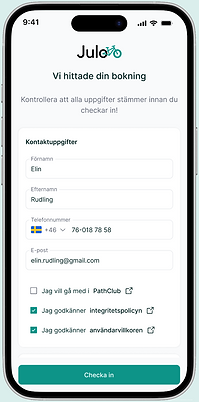
The bike drop-off view supports the process when a customer arrives to the workshop – with or without a booking – to drop off their bike for service. Originally, this flow was complex and time-consuming. It required the mechanic to enter all required details (customer, bike, and service information), often asking numerous questions to the cyclist, that is required to wait around during the process. We needed a faster, less complex alternative – the customer wants to leave promptly, and the mechanic wants to begin working on the bike.
To streamline the experience, we introduced a hybrid approach: allowing customers to pre-fill their information before arrival or during the drop-off. An initial user flow was proposed, and my role was to refine this concept into an intuitive design proposal. Additionally, I designed an alternative "manual" path for situations where customers are unable to provide details in advance. This flow combines all mechanic and customer steps onto a single device, ensuring a smooth and rapid drop-off regardless of the scenario.
Customer flow



Mechanic flow


Bike Inspection
Once the bike is handed in, the system guides the mechanic into the inspection phase. The inspection form was designed to replace chaotic paper checklists. Since mechanics typically carry a tablet while inspecting the bicycle, the interface had to be highly tactile and optimized for mobile screens. To make the process as seamless as possible, I designed a system where mechanics simply log the condition of each component. Based on the selected condition, the interface automatically suggests the required repair action, minimizing manual input. This data automatically generates a service suggestion that can be sent directly to the customer for approval.

