Exit ticket
Helps teachers customize teaching according to students needs.


Overview
Background
During this project, the team and I explored the use of digital and analog tools in primary school, focusing on challenges and strengths. To effectively identify issues and create solutions, I conducted weekly workshops with three teachers from Vilans elementary school. Using a participatory design approach, we were able to pinpoint key challenges teachers face and develop a tailored digital solution.
Role
UX/UI designer
Tools
Figma
Result
Final UI for the teacher view of the app

Homepage where the teachers can create a new ticket, see saved tickets, favorites and use a ticket template.

Page where the teachers can edit a ticket template.

Page where the teachers can see the students results and sort by latest, subject and class.

Page of a specific result where the purpose is to show the class their result.
Final UI for the student view of the app
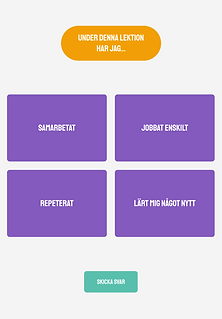
Ticket where the students can answer with multiple choices.

Ticket where the students should spell a word by dragging the suggested letters into the empty places.

Ticket where the students can write free text in a text field.

Ticket where the students should match the options by dragging the them to a free spot.
Process
Explore
To gain insights into the teachers' perspective, we visited them for a full day and observed their lessons and conducted interviews. We wanted to gather information about:
-
What tools they use and if they are efficient.
-
How they plan their lessons.
-
What works well for them and what challenges they face.
My role: Observer/interviewer
Problem
During the exploration we discovered:
-
The teachers currently use analog tools that need to be digitized to be effective.
-
It's challenging for the teachers to identifying students needs and knowledge.
To clarify the teachers' problems we held a future workshop where they brainstormed about their problems which they categorized with an affinity diagram. An identified problem was that the teachers doesn't have a good feedback source from students which makes it challenging to adjust the lessons to the students.
My role: Moderator

Solution
When the problems where identified the future workshop continued with a brainstorm session about solutions which they also categorized with an affinity diagram. A suggested solution for the lack of feedback was an app where students can answer an exit ticket on an iPad after a lesson.
My role: Moderator

Prototype
Paper prototype
To get a clear vision of the teachers needs we held another workshop for them where they got to create a storyboard and a paper prototype.
My role: Moderator
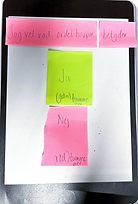


Core functions
After the workshop we analyzed the paper prototypes and noted the core functions.
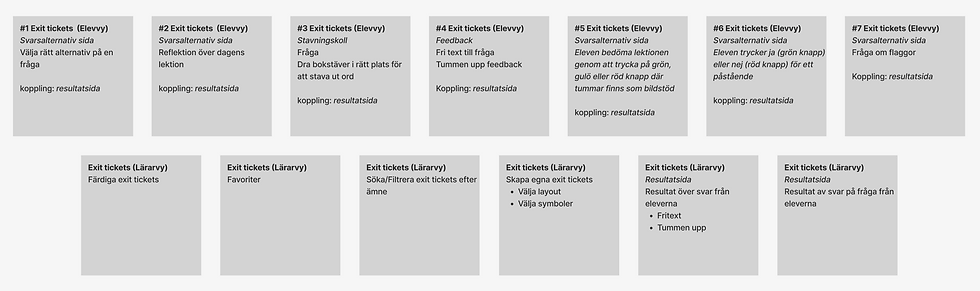
Wireframes
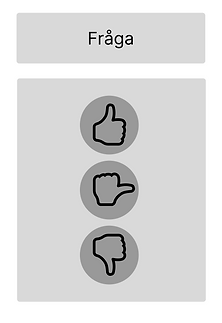
We made wireframes based on the teachers paper prototypes and the core functions.


Color scheme
When we chose color scheme it was important that it allowed the product to be both playful and simple.
Digital prototype
We started to prototype the first draft in Figma.


Evaluate
We prepared a user test with four tasks where the participants were asked to use the think-aloud method. After the tests, they were free to explore the app and provide positive and negative feedback. They expressed that we have been attentive and captured their wishes well and that they were impressed with the product. After the evaluation I continued to iterate on the prototype individually. See the final UI under Result.